
Are you looking for a way to setup payment reminders in WooCommerce? If you have an online store and regularly receive orders that remain unpaid, a payment reminder can help you follow up with customers automatically.
In this guide, we will show you how to setup a payment reminder in WooCommerce using a payment reminder plugin. Once the plugin has been configured, it can help detect orders with pending payments and send reminders to customers according to the schedule you specify.
Setting up an automated payment reminder can be particularly useful for online store owners because you do not have to manually check every unpaid order and contact customers individually. Instead, the reminder system can handle the follow-up process automatically, helping you save time while giving customers another opportunity to complete their purchases.
Table of Contents
How to Setup Payment Reminder in WooCommerce?
Setup Payment Reminder in WooCommerce
Before starting this tutorial, make sure that WooCommerce is already installed and activated on your WordPress website. WooCommerce is required because the payment reminder system works with WooCommerce orders and their payment status.
If you have not installed WooCommerce yet, install and configure it first before proceeding with the payment reminder setup.
Step 1: Get the WooCommerce Payment Reminder Plugin
The first step is to get the WooCommerce Payment Reminder plugin.
This plugin is used to help automate the process of reminding customers about orders that have not yet been paid. Instead of manually checking your WooCommerce dashboard for pending payments, the plugin can help you send reminders based on the settings you configure.
Before installing any plugin, make sure that it is compatible with your current WordPress and WooCommerce installation.
Step 2: Install the Plugin on Your WordPress Website
After obtaining the WooCommerce Payment Reminder plugin, install it on your WordPress website.
You can normally install a WordPress plugin by logging in to your WordPress dashboard and going to the plugin installation area. Upload the plugin if you have received it as a plugin file, or install it using the available WordPress plugin installation options.
Once the installation has finished, activate the plugin.
It is important to activate the plugin after installation because an inactive plugin will not be able to process payment reminders or apply its configured settings.
Step 3: Open the Payment Reminder Settings
After installing and activating the plugin, navigate to:
WooCommerce → Email → Payment Reminder
This is where you can access the payment reminder settings.
Depending on the version of WooCommerce, WordPress, or the plugin you are using, the exact appearance or location of some settings may be slightly different. However, the important thing is to locate the Payment Reminder section provided by the plugin.

Step 4: Configure Your Payment Reminder Settings
Once you are on the Payment Reminder settings page, you can configure the reminder according to your requirements.
The available settings allow you to determine how you want the payment reminder system to work. For example, you may be able to configure when reminders should be sent and how the system should handle orders that are still waiting for payment.
Take some time to review each available option before saving the configuration. The best settings will depend on your type of online store, the products you sell, and how long you normally expect customers to take to complete their payments.
It is also a good idea to make sure that your reminder messages are clear and helpful. The purpose of the reminder is to encourage customers to complete their payment rather than make them feel pressured.
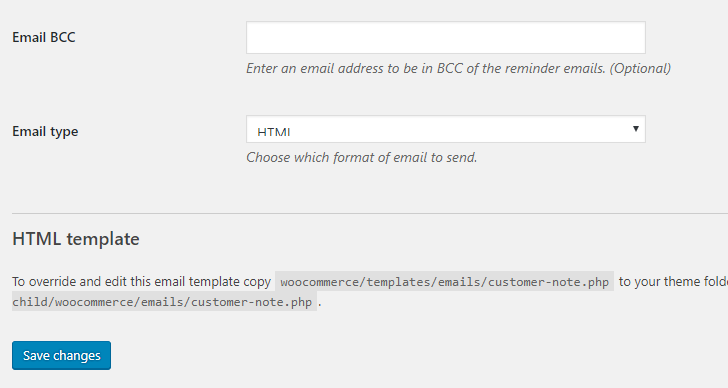
After you have finished configuring the settings, click the Save changes button.
Your payment reminder system should now be configured.
From this point onwards, orders that remain unpaid can be followed up automatically according to the settings you have selected. This means you do not have to manually check every pending order and send a separate reminder to each customer.
Why Should You Set Up a Payment Reminder in WooCommerce?
There are several reasons why an automated payment reminder can be useful for a WooCommerce store.
When a customer places an order, there is no guarantee that the payment will be completed successfully. A customer may encounter a payment error, experience a problem with their payment method, close the payment page accidentally, or simply forget to complete the transaction.
As a result, some orders may remain in a pending payment status even though the customer was interested in purchasing the product.
Without a payment reminder system, you may need to manually monitor these orders and contact customers one by one. This can become time-consuming, especially if your online store receives a large number of orders every day.
A payment reminder helps automate this follow-up process.
Recover Potentially Lost Sales
One of the main advantages of payment reminders is that they can help you recover orders that might otherwise be forgotten.
For example, imagine that a customer adds several products to their cart and completes the checkout process but does not successfully complete the payment. Without a reminder, the customer may simply forget about the order.
A reminder can give the customer another opportunity to return to the order and complete the payment.
This does not guarantee that every pending order will become a successful sale, but it can provide an additional opportunity to recover potential revenue.
Save Time
Manually following up with every unpaid order can take a considerable amount of time.
If your store receives many orders, checking each order individually and sending reminders manually can quickly become an inefficient task.
An automated payment reminder can reduce the amount of manual work required. Once the settings have been configured, the system can handle the reminder process according to the schedule you specify.
This allows you to spend more time managing other important parts of your online business.
Follow Up With Customers Automatically
Customer follow-up is an important part of running an online store.
Not every customer who fails to complete a payment has intentionally abandoned their purchase. Sometimes the problem may simply be a failed payment or an interruption during checkout.
By sending an appropriate reminder, you can inform the customer that their order is still waiting for payment and give them an opportunity to complete the transaction.
The automated system makes this process easier because you do not need to remember to contact every customer manually.
Reduce Forgotten Orders
Customers can become distracted after placing an order. They may leave the payment page, become busy with another task, or simply forget to return to the website.
A payment reminder can act as a simple follow-up notification.
By reminding customers about their pending orders, you increase the possibility that they will remember the purchase and return to complete the payment.
How Payment Reminder Can Help Your WooCommerce Store
The main purpose of a payment reminder is to automate the follow-up process for unpaid orders.
For example, if a customer places an order but the payment is unsuccessful, the order may remain pending. Instead of waiting indefinitely or manually contacting the customer, the payment reminder system can send a reminder based on the schedule that you have configured.
This can make your order management process more efficient.
However, it is important to configure the reminder frequency carefully. Sending too many reminders may annoy customers, while sending a reminder too late may reduce the possibility of recovering the order.
You should therefore choose a reminder schedule that is appropriate for your business and customer expectations.
Things to Consider When Setting Up Payment Reminders
Before activating automated reminders, there are several things you should consider.
First, make sure that the reminder message contains useful information. Customers should be able to understand that their order has not yet been paid and what they need to do next.
Second, avoid sending excessive reminders. A small number of well-timed reminders is generally more appropriate than repeatedly contacting the same customer.
Third, check your email configuration to make sure that WooCommerce emails can be delivered successfully. If your website has problems sending emails, customers may not receive the payment reminders even though the plugin itself has been configured correctly.
Finally, test the system after configuring it. A test can help you confirm that the reminder is triggered correctly and that the email contains the information you expect customers to receive.
Conclusion
Setting up a payment reminder in WooCommerce is a useful way to automate the follow-up process for orders that are still waiting for payment.
As explained in this tutorial, you first need to have WooCommerce installed on your WordPress website. You can then install and activate the WooCommerce Payment Reminder plugin, open the Payment Reminder settings, configure the available options, and save your changes.
Once configured, the reminder system can help you follow up with customers who have not completed their payments. This can save time because you do not have to manually check every pending order and contact customers individually.
A payment reminder can also provide customers with another opportunity to complete their purchases, which may help you recover some potentially lost sales.
If you regularly receive pending or unpaid orders in your WooCommerce store, setting up an automated payment reminder can be a practical addition to your order management process.
Frequently Asked Questions About WooCommerce Payment Reminders
What is a payment reminder in WooCommerce?
A payment reminder in WooCommerce is an automated notification sent to customers when they have placed an order but have not completed the payment. It helps remind customers about pending orders and gives them another opportunity to complete their purchases.
Why should I use a payment reminder in WooCommerce?
A payment reminder can help reduce forgotten or unpaid orders and potentially recover lost sales. It can also save time because you do not need to manually check every pending order and contact customers individually.
Do I need WooCommerce to set up a payment reminder?
Yes. The payment reminder system described in this guide is designed to work with WooCommerce. Therefore, WooCommerce should already be installed and activated on your WordPress website before configuring the payment reminder.
How do I set up a payment reminder in WooCommerce?
You can set up a payment reminder by installing and activating the appropriate payment reminder plugin. After activation, go to WooCommerce → Email → Payment Reminder, configure the available settings, and save your changes.
Can payment reminders be sent automatically?
Yes. Once the payment reminder plugin has been properly configured, reminders can be handled automatically according to the settings and schedule you specify.
Can a payment reminder help recover abandoned orders?
A payment reminder may help recover some unpaid orders by reminding customers to return and complete their payments. However, it does not guarantee that every customer will complete the purchase.
Can I customize the payment reminder settings?
The available customization options depend on the payment reminder plugin you are using. Generally, the settings allow you to control aspects of when and how payment reminders are sent.
How many payment reminders should I send to customers?
There is no universal number that is suitable for every online store. It is generally better to use a reasonable reminder schedule rather than sending too many messages. Excessive reminders may annoy customers and negatively affect their shopping experience.
Why are my WooCommerce payment reminder emails not being received?
If customers are not receiving payment reminders, check your WooCommerce email configuration, WordPress email delivery settings, and the payment reminder plugin configuration. Your website may also require a properly configured SMTP service to improve email delivery.
Should I test the payment reminder after setting it up?
Yes. Testing the payment reminder system is recommended after configuration. A test can help you confirm that the reminder is triggered correctly and that the email contains the appropriate information for customers.
Can payment reminders save time for WooCommerce store owners?
Yes. Automated payment reminders can reduce the need to manually monitor unpaid orders and contact customers individually. This can be particularly useful for stores that receive a large number of orders.
Are payment reminders useful for small WooCommerce stores?
Yes. Even a small WooCommerce store can benefit from payment reminders because they automate customer follow-up and help prevent unpaid orders from being forgotten.
References
- Creating a WooCommerce payment reminder - docs.wpovernight.com
- Payment Reminder for WooCommerce - woohelpdesk.com