
Changing your Facebook Page URL is one of the simplest ways to make your page look more professional and easier to remember. Whether you own a business, manage a brand, run a community, or operate a personal project, having a clean and customized Facebook Page URL improves your online presence and makes it easier for people to find your page.
Many Facebook Pages begin with automatically generated URLs that contain random numbers or generic usernames. While these default URLs work, they are not ideal for branding, marketing, or search engine optimization. A custom URL creates a more trustworthy appearance and allows customers to remember your Facebook Page more easily.
If you have been searching for the correct way to change Facebook Page URL, this comprehensive guide explains everything you need to know. It covers the requirements, preparation steps, detailed instructions, common issues, troubleshooting tips, best practices, and important considerations before making any changes.
Table of Contents
How to Change Facebook Page URL? A Complete Step-by-Step Guide
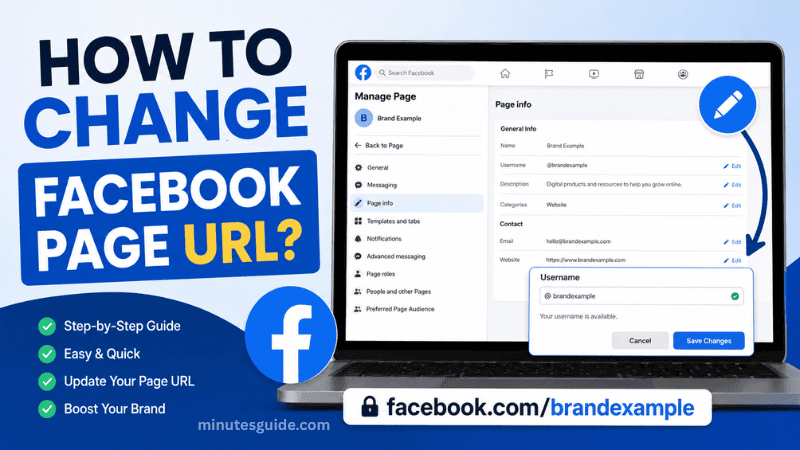
What Is a Facebook Page URL?
A Facebook Page URL is the unique web address that directs visitors to your Facebook Page. It serves as the permanent online location of your page and is often used in advertisements, business cards, email signatures, websites, and social media profiles.
For example, a default Facebook Page URL may look like this:
https://www.facebook.com/profile.php?id=123456789012345After customization, it becomes much cleaner:
https://www.facebook.com/YourBusinessNameThe custom part after "facebook.com/" is known as the username. When people type this address into their browser, they are taken directly to your Facebook Page.
Why Should You Change Your Facebook Page URL?
There are several important reasons why businesses and content creators decide to change their Facebook Page URL.
Better Brand Recognition
A custom URL strengthens your brand identity by making your business name consistent across different online platforms. Customers are more likely to remember a short, branded URL than a long address containing random numbers.
Easier to Share
A customized Facebook Page URL is much easier to include on:
- Business cards
- Flyers
- Product packaging
- Email signatures
- Company websites
- Marketing materials
- YouTube descriptions
- Instagram profiles
People can type the URL manually without making mistakes.
Improved Professional Appearance
A professional-looking URL increases credibility. Visitors often associate clean URLs with legitimate businesses and organizations.
Better Search Engine Visibility
Although Facebook Page URLs are only one part of SEO, having your business name in the URL can help reinforce your online branding across search engines.
When users search for your business name, a customized Facebook URL is generally easier to recognize within search results.
Consistent Branding
Most successful businesses use the same username across multiple social media platforms.
For example:
- Facebook: facebook.com/YourBrand
- Instagram: instagram.com/YourBrand
- X: x.com/YourBrand
- YouTube: youtube.com/@YourBrand
Consistency helps customers find your business quickly.
Facebook Requirements Before You Change Your Page URL
Facebook has several requirements that must be met before allowing a Page username to be changed.
These include:
| Requirement | Description |
|---|---|
| Page administrator | You must have full Facebook Page admin access. |
| Username availability | The desired username must not already be in use. |
| Username policy | The username must follow Facebook naming guidelines. |
| Unique name | Each Facebook username must be unique. |
| Valid characters | Only letters, numbers, and periods are generally allowed. |
| Minimum length | The username must meet Facebook's character requirements. |
If your Page does not meet these conditions, Facebook may reject your request.
How to Change Facebook Page URL on Desktop
Changing the Facebook Page URL on a desktop computer is usually the easiest method because all management options are clearly displayed.
Follow these steps carefully.
Step 1: Log Into Facebook
Open your preferred web browser and sign in to the Facebook account that manages your Facebook Page.
Ensure that you are using an account with administrator permissions.
Step 2: Open Your Facebook Page
Click your profile picture.
Navigate to the Facebook Page you want to edit.
Wait until the Page dashboard loads completely.
Step 3: Open Settings
Locate the Settings section from the Page management menu.
Facebook occasionally updates its interface, so the exact location may differ slightly depending on the latest version.
Step 4: Find the Username Option
Inside the Page settings, locate the section related to:
- Username
- Page Info
- Page Settings
Click the Username field.
Step 5: Enter Your New Username
Type the username you want to use.
For example:
BestCoffeeShopFacebook immediately checks whether the username is available.
If the username is already taken, you'll need to choose another variation.
Step 6: Save Changes
Once Facebook confirms availability, save the changes.
Your new Facebook Page URL becomes:
https://www.facebook.com/BestCoffeeShopThe update may become active immediately, although in some cases it may take a short time to propagate.
How to Change Facebook Page URL Using the Mobile App
You can also change the Facebook Page URL using the Facebook mobile application.
The exact interface may differ between Android and iPhone.
Step 1
Open the Facebook app.
Step 2
Switch to the Page you manage.
Step 3
Tap the Menu.
Step 4
Open Settings.
Step 5
Locate the Username section.
Step 6
Enter your preferred username.
Step 7
Save your changes.
If the option does not appear in the mobile app, try using a desktop browser instead.
Facebook Username Rules
Facebook has several naming policies that users must follow.
Generally, your username should:
- Match your business name
- Be easy to spell
- Be easy to remember
- Avoid unnecessary punctuation
- Avoid misleading words
- Avoid offensive language
- Avoid trademark violations
A good username might be:
GreenGardenCafeA poor username would be:
Best-Cafe-Official-2026!!!Simple usernames are easier for customers to remember.
Tips for Choosing the Best Facebook Page URL
Selecting the right Facebook Page URL is important because it becomes part of your online identity.
Consider the following recommendations.
Use Your Business Name
Whenever possible, use your official business name.
For example:
facebook.com/BlueOceanTravelKeep It Short
Short URLs are easier to remember and easier to type.
Avoid Numbers
Numbers often create confusion unless they are part of your official brand.
Instead of:
CoffeeShop789Use:
CoffeeShopMatch Other Social Media Platforms
Try to use the same username across every social media account.
This creates a stronger digital brand.
Avoid Special Characters
Keep the URL clean.
Too many symbols reduce readability.
Common Reasons Facebook Rejects Your Username
Sometimes Facebook will not allow the change.
Common reasons include:
| Reason | Explanation |
|---|---|
| Already taken | Another Page is already using the username. |
| Policy violation | The username violates Facebook guidelines. |
| Trademark conflict | The requested username infringes on another trademark. |
| Too generic | Some common words may not be approved. |
| Frequent changes | Too many recent username changes may trigger restrictions. |
| Suspicious activity | Facebook detects unusual account activity. |
What Happens After You Change Your Facebook Page URL?
Several things happen after the update.
The New URL Becomes Active
Visitors can access your Facebook Page using the new address.
Update Your Marketing Materials
Remember to update:
- Business website
- Email signature
- QR codes
- Business cards
- Product packaging
- Advertisements
- Social media profiles
- Online directories
Outdated links may confuse customers.
Search Engines Need Time
Search engines may require some time before indexing the updated Facebook Page URL.
This process varies depending on search engine crawling schedules.
Common Problems When Changing Facebook Page URL
Some users encounter issues during the process.
Username Not Available
This is the most common problem.
Try adding:
- Company location
- Official abbreviation
- Business category
Example:
BlueOceanTravelMYSave Button Is Disabled
Possible reasons include:
- Invalid characters
- Username too short
- Username too long
- Existing policy violations
Settings Option Missing
Make sure:
- You are logged in as Page Admin.
- You are editing a Facebook Page rather than a personal profile.
- Your Facebook interface has fully loaded.
- You are using the latest Facebook version.
Best Practices After You Change Facebook Page URL
Once your new URL is active, follow these recommendations.
Test the Link
Open the URL in multiple browsers to ensure it works correctly.
Share the New URL
Announce the updated Facebook Page URL through:
- Email newsletters
- Website announcements
- X
- WhatsApp Business
Update QR Codes
If your old QR code points to the previous address, generate a new one.
Maintain Consistency
Use the same username across all future branding materials.
Advantages and Disadvantages of Changing Facebook Page URL
| Advantages | Disadvantages |
|---|---|
| Easier to remember | Old printed materials may become outdated |
| Improves branding | Preferred username may already be taken |
| More professional appearance | Changing too frequently may confuse followers |
| Easier to share offline | Some changes may require approval |
| Better marketing consistency | Existing links may need updating |
| Supports brand recognition | Username rules limit available choices |
Comparison Between Default URL and Custom URL
| Feature | Default Facebook URL | Custom Facebook URL |
|---|---|---|
| Readability | Poor | Excellent |
| Branding | Weak | Strong |
| Memorability | Low | High |
| Professional appearance | Average | Excellent |
| Easy sharing | Difficult | Very easy |
| Marketing value | Limited | High |
Frequently Asked Mistakes
Many Page owners accidentally make avoidable mistakes when changing their Facebook Page URL.
Some of the most common include:
- Choosing a username that is too long.
- Using unnecessary numbers.
- Using multiple underscores or symbols.
- Forgetting to update their website.
- Printing business cards before confirming the new URL.
- Selecting a username that does not match their actual brand.
Planning your username carefully before saving can help prevent these issues.
Is It Safe to Change Facebook Page URL?
Yes. Changing your Facebook Page URL is generally safe when performed through Facebook's official settings.
However, it is important to verify the new URL immediately after making the change and update all places where your old Facebook link was previously displayed.
Businesses should also inform customers if the Page URL has changed to avoid confusion.
Final Thoughts
Learning how to change Facebook Page URL is a valuable step toward building a stronger and more recognizable online presence. A customized URL makes your Facebook Page easier to remember, improves brand consistency, and presents a more professional image to customers, clients, and followers.
Before making any changes, take time to select a username that accurately represents your brand and can continue to serve your business as it grows. A short, memorable, and consistent username is often the best long-term choice. After updating your Facebook Page URL, remember to revise your website, marketing materials, social media profiles, and any printed resources to reflect the new address.
While the process is relatively straightforward, careful planning helps avoid unnecessary complications and ensures your audience can continue finding your Facebook Page without interruption. By following the steps and best practices outlined in this guide, you can successfully change Facebook Page URL and strengthen your overall digital branding strategy.
Final Thoughts
Can I change my Facebook Page URL more than once?
Yes, Facebook allows you to change your Facebook Page URL more than once, provided your Page meets the platform's eligibility requirements. However, frequent changes are not recommended because they may confuse your audience and require you to update links across your website, marketing materials, and social media profiles.
Why can't I change my Facebook Page URL?
There are several reasons why Facebook may prevent you from changing your Page URL. Common causes include not having administrator access, choosing a username that is already in use, violating Facebook's username policies, or attempting to make changes too frequently. Ensure you have full admin permissions and select a unique username that complies with Facebook's guidelines.
Does changing my Facebook Page URL affect my followers?
No. Changing your Facebook Page URL does not remove your followers, likes, posts, photos, videos, or other Page content. Only the web address (URL) changes, while your Page and its existing audience remain intact.
Will my old Facebook Page URL still work?
In many cases, the old custom URL may no longer direct visitors to your Page after the change. Because of this, you should update your website, email signatures, QR codes, business cards, advertisements, and any other locations where the previous Facebook Page URL was shared.
How long does it take for the new Facebook Page URL to become active?
Most Facebook Page URL changes take effect immediately after they are approved. However, it may take a short period for the new URL to become fully accessible across Facebook and for search engines to recognize the updated address.
Can I use special characters in my Facebook Page URL?
No. Facebook only allows certain characters in usernames. Generally, usernames may contain letters, numbers, and periods, while spaces and most special characters are not permitted. Always follow Facebook's current username policies when selecting a new URL.
Does changing my Facebook Page URL improve SEO?
Changing your Facebook Page URL alone will not dramatically improve search engine rankings. However, using a clean, branded, and memorable URL strengthens your overall online presence, supports brand consistency, and makes it easier for users to recognize your business in search results.
Can two Facebook Pages have the same URL?
No. Every Facebook username must be unique. If another Page is already using your preferred username, you will need to choose a different variation that is available.
Do I need administrator access to change a Facebook Page URL?
Yes. Only users with administrator privileges or full Facebook Page access can change the Page username and URL. Editors and other Page roles may not have permission to perform this action.
Is it safe to change my Facebook Page URL?
Yes. Changing your Facebook Page URL through Facebook's official settings is completely safe. Before making the change, choose a username that reflects your brand and is suitable for long-term use. After updating the URL, remember to replace any old Facebook links on your website and promotional materials.
References
- Change your Page's username and web address - facebook.com/help
- How to Change Facebook Page URL: The Ultimate Guide - litcommerce.com/blog