
If you are planning to create a website with WordPress, one of the first decisions you may encounter is whether you should use WordPress.com or WordPress.org. Although both platforms are closely related and use the same core WordPress software, they provide very different experiences when it comes to hosting, customization, maintenance, pricing, security, and technical control.
Understanding the difference WordPress.com and WordPress.org is particularly important for beginners because the two names can be confusing. Many people assume that WordPress.com and WordPress.org are simply two versions of the same service, but the distinction is mainly related to how the WordPress software is hosted and managed.
WordPress.org provides the open-source WordPress software that you can download and install on a web hosting account of your choice. This approach is commonly referred to as self-hosted WordPress. You are responsible for choosing your hosting provider, configuring your website, managing updates, installing themes and plugins, and handling many aspects of website maintenance.
WordPress.com, on the other hand, is a managed hosting platform that uses the WordPress software. Hosting, many security features, updates, backups, and other technical components can be managed for you, depending on your plan. This makes WordPress.com particularly attractive to people who want to create a website without managing the technical infrastructure themselves.
In this guide, we will explain the difference WordPress.com and WordPress.org in detail so that you can understand how each platform works and determine which approach fits your website requirements.
Table of Contents
What The Difference WordPress.com and WordPress.org?
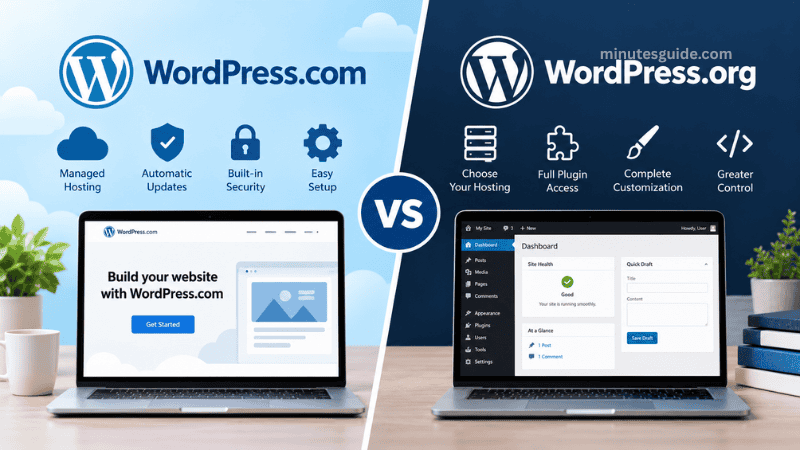
What Is WordPress.org?
WordPress.org is the official website for the open-source WordPress software project. The software itself is free to download and use under the GPL license, and it can be installed on a compatible web hosting server.
When people talk about a “self-hosted WordPress website,” they are generally referring to a website built using the WordPress software obtained through WordPress.org and installed on a hosting provider. WordPress.org itself does not provide the traditional hosting arrangement for your individual website. Instead, you choose a separate hosting company and use its server to run WordPress.
With this approach, you generally have much greater control over your website environment. You can choose your hosting provider, select a suitable hosting package, install themes and plugins, modify files, configure various server settings, and make advanced changes to your website.
For example, if you want to build a business website with a highly customized design, an affiliate website with specialized functionality, an online store, or a content-heavy blog, self-hosted WordPress can provide considerable flexibility.
However, greater control also means greater responsibility. You need to consider website security, backups, software updates, plugin compatibility, hosting performance, domain registration, SSL configuration, and other technical matters.
WordPress.org currently recommends that hosting environments support PHP 8.3 or newer, MariaDB 10.11 or newer or MySQL 8.0 or newer, and HTTPS. Apache or Nginx are also recommended server environments.
What Is WordPress.com?
WordPress.com is a managed hosting platform that uses the open-source WordPress software to provide a more integrated website-building experience.
Instead of downloading WordPress and finding a separate hosting company, you can create an account with WordPress.com and build your website within its hosted environment. Hosting is included as part of the service, so you do not need to purchase a separate hosting account simply to get started.
WordPress.com provides different plans designed for different types of users and websites. The available features can vary depending on the plan you choose. The platform handles many technical responsibilities, including hosting infrastructure, security, updates, and backups, allowing website owners to focus more on creating and managing content.
WordPress.com also provides a free option. However, the free plan uses a WordPress.com subdomain, such as yourwebsite.wordpress.com, rather than a custom domain. Paid plans provide additional features and can support custom domains and other capabilities.
The main attraction of WordPress.com is convenience. Instead of assembling different services yourself, many of the essential components required to operate a website are provided within one platform.
The Main Difference Between WordPress.com and WordPress.org
The most important difference WordPress.com and WordPress.org is hosting and website management.
WordPress.com provides managed hosting, meaning the hosting environment and many technical responsibilities are handled by the platform. WordPress.org provides the WordPress software, which you install on a hosting account that you choose and manage.
This distinction affects almost every other aspect of running a website.
With WordPress.com, you generally spend less time managing server infrastructure and technical maintenance. With WordPress.org, you generally have greater control over the hosting environment and website configuration, but you also have more responsibilities.
It is therefore more accurate to think of the comparison as managed WordPress hosting versus self-hosted WordPress rather than two completely different website-building systems. Both approaches use the same core WordPress software.
WordPress.com vs WordPress.org: Comparison Table
| Feature | WordPress.com | WordPress.org |
|---|---|---|
| WordPress software | Uses WordPress | Provides the WordPress software |
| Hosting | Managed hosting included | You choose and pay for hosting |
| Setup | Generally easier | Requires more configuration |
| Technical maintenance | Many tasks are handled for you | You are responsible for most maintenance |
| Security | Managed security features | Depends largely on your hosting and configuration |
| Backups | Managed depending on plan | You arrange and manage backups |
| Themes | Themes and customization available | Wide range of themes and custom themes |
| Plugins | Plugin availability depends on plan | Broad plugin flexibility |
| Server control | More limited | Greater control |
| Custom code | Available depending on plan and environment | Extensive control over files and environment |
| Hosting choice | Hosted by WordPress.com | Choose your own hosting provider |
| Support | WordPress.com support is available | Community and hosting-provider support |
| Scalability | Can scale through WordPress.com plans | Depends on your hosting infrastructure |
| Technical responsibility | Lower | Higher |
| Flexibility | High, depending on plan | Very high |
| Suitable for beginners | Yes | Yes, although more technical knowledge can help |
The exact features available on WordPress.com can change by plan, so it is important to check the current plan details before making a purchase.
Hosting Differences
Hosting is one of the biggest factors separating WordPress.com from WordPress.org.
With WordPress.com, hosting is integrated into the platform. You do not need to purchase hosting from another company before creating your website. WordPress.com manages the hosting infrastructure as part of its service.
With WordPress.org, you need to obtain hosting separately. After downloading WordPress, you install the software on your hosting server. Many hosting companies offer WordPress-specific hosting packages, and some providers offer one-click installation tools to simplify the process.
The advantage of choosing your own hosting is that you can compare different providers based on price, server location, performance, storage, bandwidth, support, backup options, and other technical specifications.
The disadvantage is that you need to research and manage these services yourself.
Ease of Use
For beginners, ease of use can be an important consideration.
WordPress.com is designed to reduce the technical work required to launch a website. You can create an account, select a plan, choose a design, configure your website, and begin publishing content without first setting up a separate hosting account.
The platform also manages many technical processes behind the scenes. This can be useful for bloggers, small businesses, professionals, and website owners who prefer to spend their time creating content rather than managing servers.
WordPress.org can also be relatively easy to use once WordPress has been installed. The WordPress dashboard itself is familiar to millions of website owners. However, setting up and maintaining the overall website environment can involve additional steps.
For example, a self-hosted website may require you to manage your domain, hosting account, SSL certificate, backups, WordPress updates, plugins, themes, and security settings.
Therefore, WordPress.org is not necessarily difficult, but it usually gives you more responsibilities.
Customization and Flexibility
Customization is another major consideration when comparing WordPress.com and WordPress.org.
Self-hosted WordPress gives you substantial freedom to install custom themes, plugins, and code. Developers can also make advanced modifications to the website environment and, depending on the hosting configuration, access server-side settings that are not normally available in a managed environment.
This makes WordPress.org particularly attractive to developers, agencies, businesses, and advanced website owners who need specialized functionality.
WordPress.com also provides extensive customization options, and eligible paid plans support plugin installation and custom themes. However, the available functionality depends on the plan and the platform's managed environment.
For a simple blog or business website, the customization available through WordPress.com may be more than sufficient. For a highly customized application or website requiring specific server-level modifications, self-hosted WordPress may provide more flexibility.
Plugins
Plugins are one of the most important reasons WordPress has become such a popular content management system.
A plugin can add functionality to your website without requiring you to develop everything from scratch. For example, plugins can provide contact forms, SEO tools, security features, caching, analytics integrations, membership systems, e-commerce functionality, and many other features.
With self-hosted WordPress, you have broad freedom to install compatible plugins from the WordPress ecosystem or use custom plugins.
WordPress.com also supports plugins, but the availability and installation capabilities depend on the plan you choose. WordPress.com states that plugin installation is available on its paid plans, while its managed environment can also handle plugin updates and security considerations.
This distinction is important because beginners sometimes assume that every WordPress.com website has exactly the same plugin flexibility as every WordPress.org website. That is not necessarily the case.
Themes and Website Design
Both WordPress.com and WordPress.org support themes, which control much of the visual appearance and layout of a WordPress website.
WordPress.com provides a selection of themes and customization tools. Depending on the plan, users can access additional customization features, custom themes, or other advanced design capabilities.
With self-hosted WordPress, you can install themes from the WordPress theme directory, purchase premium themes, upload custom themes, or develop your own theme.
This makes WordPress.org especially flexible for users who want complete control over their website's appearance.
However, having more options can also create more work. A self-hosted website owner is responsible for ensuring that themes are properly maintained, compatible with the current version of WordPress, and obtained from trustworthy sources.
Security
Website security is an important consideration regardless of which WordPress option you choose.
WordPress.com provides managed security features and handles many technical security responsibilities as part of its hosting environment. WordPress.com also manages updates and other infrastructure-related security tasks.
With self-hosted WordPress, the responsibility is more distributed between you and your hosting provider.
Your hosting company may provide server-level security, firewalls, malware monitoring, backups, SSL certificates, and other services. However, you are generally responsible for keeping WordPress, themes, and plugins updated and for configuring your website securely.
This does not mean that WordPress.org is inherently insecure. A properly maintained self-hosted WordPress website can be highly secure. However, the owner needs to take a more active role in maintaining the website.
Website Maintenance
Maintenance is another area where the two approaches differ significantly.
WordPress.com is designed to reduce the amount of routine technical maintenance required from the website owner. Automatic updates, backups, hosting management, and other services can be provided depending on the plan.
With WordPress.org, you have greater responsibility for maintaining your website.
Regular maintenance may include updating WordPress, plugins, and themes, monitoring website security, checking backups, optimizing performance, removing unused plugins, resolving compatibility issues, and ensuring that the website remains functional.
For someone who enjoys managing websites, this level of control can be beneficial. For someone who simply wants to publish articles or operate a basic company website, managed hosting may be more convenient.
Cost Differences
Cost is another major factor when deciding between WordPress.com and WordPress.org.
WordPress itself is open-source software and can be downloaded from WordPress.org without purchasing the software. However, a self-hosted website normally requires a domain name and web hosting, both of which may involve recurring costs.
You may also purchase premium themes, plugins, security services, backup solutions, email services, or other tools depending on your website requirements.
WordPress.com has a free plan and several paid plans. The free plan includes hosting but uses a WordPress.com subdomain. Paid plans provide additional features, with pricing and features varying according to the selected plan.
Therefore, it is important not to compare only the basic price of each option. You should compare the total cost of the features you actually require.
A self-hosted WordPress website may appear inexpensive when considering only the WordPress software because the software is free. However, hosting, domain registration, premium plugins, themes, backups, security tools, and maintenance can increase the total cost.
Similarly, a WordPress.com plan may cost more than a basic hosting package but can include services that would otherwise need to be purchased separately.
Domain Name Differences
Your domain name is the web address people use to access your website.
WordPress.com provides a free WordPress.com subdomain with its free plan. For example, a website might use an address such as yourwebsite.wordpress.com. Custom domain functionality is available through paid plans.
With self-hosted WordPress, you generally purchase or register a domain separately from your hosting provider or through a domain registrar.
For a professional business, a custom domain is usually important because it provides a more independent and recognizable web address.
For example, a company may prefer www.example.com rather than example.wordpress.com.
SEO Considerations
Search engine optimization, commonly known as SEO, is another consideration for website owners.
Both WordPress.com and WordPress.org websites can be optimized for search engines. The platform itself does not automatically guarantee search rankings.
WordPress.com states that its websites are optimized for search engines by default and provides tools that can help website owners improve page structure, metadata, image alt text, links, and other SEO elements.
Self-hosted WordPress provides extensive opportunities for SEO through themes, plugins, technical configuration, performance optimization, structured data, caching, and other tools.
However, SEO success depends on many factors beyond the platform itself. Content quality, website structure, page speed, mobile usability, technical SEO, backlinks, search intent, competition, and ongoing content development can all influence search performance.
Therefore, choosing WordPress.com or WordPress.org should not be based solely on the assumption that one platform automatically ranks better than the other.
Support
Support is another area where WordPress.com and WordPress.org differ.
WordPress.com provides official support resources, documentation, community forums, and paid-plan support options. Its support system is integrated into the managed hosting service.
With self-hosted WordPress, there is no single hosting company responsible for your entire website because you select your own hosting provider.
You can obtain assistance from WordPress.org documentation and community forums, your hosting provider, plugin developers, theme developers, web developers, and other WordPress communities.
This can provide access to a huge amount of information, but finding the correct solution may sometimes require more research.
Who Should Use WordPress.com?
WordPress.com can be a suitable choice for users who prioritize convenience and want to minimize technical responsibilities.
It can be useful for beginners who are creating their first website and do not want to learn about server configuration, hosting management, backups, or security administration.
It may also be suitable for bloggers, professionals, small businesses, portfolio websites, personal websites, and organizations that prefer managed hosting.
Another benefit is that you can start with a simpler plan and move to a more advanced plan as your website requirements grow. WordPress.com offers different plans designed for different levels of website functionality.
Who Should Use WordPress.org?
WordPress.org can be particularly suitable for users who want maximum control over their website and hosting environment.
It can be useful for developers, agencies, experienced bloggers, online businesses, affiliate marketers, publishers, and companies that require extensive customization.
Self-hosted WordPress is also attractive when you want to choose your own hosting company and have greater control over themes, plugins, website files, databases, and technical configurations.
However, you should be prepared to take responsibility for website maintenance and security.
Advantages and Disadvantages of WordPress.com
| Advantages | Disadvantages |
|---|---|
| Managed hosting is included | Some advanced features depend on the selected plan |
| Easier setup for beginners | Less control over the hosting environment |
| Many technical tasks are managed | Customization can depend on plan restrictions |
| Security and updates are managed | Advanced users may prefer more server control |
| Support is available | Costs can increase when additional features are required |
| Free option is available | Free plan uses a WordPress.com subdomain |
| Suitable for users who want convenience | Certain advanced configurations may not be available |
Advantages and Disadvantages of WordPress.org
| Advantages | Disadvantages |
|---|---|
| WordPress software is free | Hosting must be purchased separately |
| Extensive customization | More technical responsibility |
| Wide plugin flexibility | You must manage updates |
| Custom themes can be installed | Security requires active management |
| Greater hosting control | Backups may need to be configured |
| Suitable for advanced websites | Plugin and theme conflicts can occur |
| You can choose your hosting provider | Maintenance takes additional time |
Which One Should You Choose?
The answer depends on what you need from your website rather than simply choosing one platform based on popularity.
If your priority is simplicity, managed hosting, and reduced technical maintenance, WordPress.com may provide a convenient solution.
If your priority is maximum flexibility, extensive customization, hosting choice, and greater technical control, self-hosted WordPress using the WordPress.org software may be more appropriate.
For example, a beginner who wants to create a personal blog and focus primarily on writing may appreciate the convenience of WordPress.com.
On the other hand, someone building a highly customized business website may prefer self-hosted WordPress because of the greater freedom available through themes, plugins, hosting configuration, and custom development.
The decision should therefore be based on your website's purpose, technical experience, budget, required features, and willingness to handle maintenance.
Can You Move From WordPress.com to WordPress.org?
Yes. Moving between WordPress.com and self-hosted WordPress is possible.
WordPress.com states that WordPress websites can be migrated to or from WordPress.com, which means choosing one option today does not necessarily prevent you from changing your hosting arrangement later.
However, migration should be planned carefully.
Before moving a website, you should consider your posts, pages, images, media files, users, menus, themes, plugins, settings, domain configuration, redirects, and SEO elements.
A migration can also involve changing hosting environments, DNS records, SSL configuration, email services, and other technical components.
For a small website, migration may be relatively straightforward. For a large business website or established blog with significant search traffic, it is advisable to plan the migration carefully to reduce the risk of broken links, missing files, downtime, or SEO problems.
Common Misunderstanding About WordPress.com and WordPress.org
One of the most common misunderstandings is that WordPress.com and WordPress.org use completely different website software.
They do not.
Both are connected to the same WordPress ecosystem and use the WordPress software. The key distinction is how that software is delivered, hosted, and managed.
WordPress.org provides the open-source WordPress project and software, while WordPress.com provides a managed hosting service built around WordPress.
Another common misunderstanding is that WordPress.org is completely free in every sense.
The WordPress software itself is free, but a self-hosted website normally requires paid hosting and a domain. Other services, such as premium themes, plugins, backup tools, and security products, may also create additional costs.
Similarly, WordPress.com should not automatically be considered a completely free platform simply because it offers a free plan. The free plan has limitations, and users who need custom domains or additional features may need a paid plan.
Difference Between WordPress.com and WordPress.org: Final Summary
The difference WordPress.com and WordPress.org becomes much easier to understand once you focus on hosting and responsibility.
WordPress.com is a managed hosting platform that uses WordPress software. It provides an integrated environment where hosting and many technical responsibilities are handled for you. This can make it a convenient option for beginners and website owners who prefer to concentrate on publishing content rather than maintaining infrastructure.
WordPress.org provides the open-source WordPress software that you can install on a hosting provider of your choice. This gives you greater control over your website, hosting environment, themes, plugins, and technical configuration, but it also means that you take greater responsibility for maintenance, security, backups, and performance.
Neither option is universally suitable for every website. The appropriate choice depends on your goals, technical knowledge, budget, desired level of control, and willingness to manage your website's technical requirements.
If you want a convenient, managed experience, WordPress.com can provide that approach. If you want greater freedom and control over a self-hosted WordPress installation, WordPress.org gives you the flexibility to build and manage your website using hosting of your choice.Understanding this distinction before creating your website can help you avoid confusion and select an environment that matches your long-term website requirements.
Frequently Asked Questions
What is the main difference WordPress.com and WordPress.org?
The main difference WordPress.com and WordPress.org is how the website is hosted and managed. WordPress.com is a managed hosting platform where hosting and many technical responsibilities are handled for you. WordPress.org provides the open-source WordPress software, which you can install on a web hosting account of your choice. With WordPress.org, you generally have greater control but also more responsibility for maintenance, security, backups, and updates.
Is WordPress.org free to use?
Yes, the WordPress software available from WordPress.org is free and open-source. However, running a self-hosted WordPress website normally involves additional costs, such as domain registration and web hosting. You may also spend money on premium themes, plugins, security services, backup solutions, or other website-related services depending on your requirements.
Is WordPress.com free?
WordPress.com offers a free plan, although it comes with limitations. For example, the free plan uses a WordPress.com subdomain rather than a fully independent custom domain. Additional features and customization options are available through paid plans, with the exact features depending on the plan selected.
Which is easier for beginners, WordPress.com or WordPress.org?
WordPress.com can be easier for beginners because hosting and many technical aspects of running a website are managed within the platform. WordPress.org can also be used by beginners, particularly when a hosting provider offers a simple WordPress installation process, but self-hosted websites generally require more involvement in areas such as updates, backups, security, and hosting management.
Can I use plugins on WordPress.com?
Yes, WordPress.com supports plugins, although plugin-related features depend on the plan and the capabilities available to your website. Self-hosted WordPress through WordPress.org generally provides broader freedom to install compatible plugins, including custom plugins and plugins obtained from different sources.
Can I use a custom domain with WordPress.com?
Yes, WordPress.com supports custom domains through its paid plans. The free WordPress.com plan uses a WordPress.com subdomain. A custom domain can provide a more professional web address for businesses, blogs, portfolios, and other websites.
Which is better for SEO, WordPress.com or WordPress.org?
Both WordPress.com and WordPress.org can be used to create search-engine-friendly websites. SEO performance depends on many factors, including content quality, website structure, page speed, mobile usability, technical SEO, links, and competition. The choice between WordPress.com and WordPress.org should therefore not be based solely on the assumption that one platform automatically provides better search rankings.
Can I install custom themes on WordPress.org?
Yes. Self-hosted WordPress provides considerable flexibility when it comes to themes. You can use themes from the WordPress theme directory, purchase premium themes, upload compatible themes, or develop a custom theme. This flexibility makes WordPress.org suitable for websites that require extensive design customization.
Which option gives me more control over my website?
Self-hosted WordPress using the WordPress.org software generally provides more control over the website and hosting environment. You can choose your hosting provider, install compatible plugins and themes, modify website files, and make various technical configurations. This additional control also means that you have more responsibility for maintaining the website.
Is WordPress.com or WordPress.org better for a business website?
The appropriate option depends on the business's requirements. WordPress.com can be suitable for businesses that prefer managed hosting and want to reduce technical maintenance. WordPress.org can be suitable for businesses that require extensive customization, specialized plugins, greater hosting control, or more advanced technical configurations.
Can I migrate my website from WordPress.com to WordPress.org?
Yes, it is possible to migrate a website from WordPress.com to self-hosted WordPress. The migration process can involve transferring posts, pages, media files, users, settings, and other website components. Domain configuration, redirects, plugins, themes, and SEO considerations should also be reviewed carefully during the migration.
Do I need web hosting for WordPress.org?
Yes. When using the WordPress software from WordPress.org, you normally need to install it on a web hosting account. You can choose a hosting provider based on factors such as performance, storage, security, technical support, server location, and pricing.
Does WordPress.com include web hosting?
Yes. WordPress.com is a managed hosting platform, so hosting is integrated into the service. This means you do not need to purchase a separate hosting account simply to create a WordPress.com website.
Can I make money with WordPress.com and WordPress.org?
Both platforms can be used for websites that generate income, although the available monetization methods and requirements can vary. Depending on the website and plan, monetization can include advertising, affiliate marketing, selling products or services, memberships, digital products, and other business models. Before choosing a platform, you should check the current terms and available features for your intended monetization method.
Should I choose WordPress.com or WordPress.org for blogging?
Both can be suitable for blogging. WordPress.com may be convenient if you want managed hosting and fewer technical responsibilities, while self-hosted WordPress can provide greater control over themes, plugins, monetization, hosting, and website configuration. Your choice should depend on how much control and technical flexibility you expect to need as your blog grows.
References
- WordPress.com vs. WordPress.org: What's the difference? - wordpress.com
- WordPress.com vs WordPress.org: The Key Differences - elementor.com